- Palm Rejection & Tilt Function -This Apple pencil iPad 10th generation has a very sensitive tilt function, different tilt angles can draw lines of different thickness. The Apple pencil 2nd generation compatible with multiple applications, such as Procreate, Goodnotes, Concept etc. Smart Apple pencil for iPad 9th generation with palm rejection. Don't need to wear gloves. Full screen to prevent anti touch. You can rest your hand on the screen while you write with Apple iPad pencil
- USB C Charging - This Apple iPad pencil supports rapid USB-C charging, reaching 100% in only 90 minutes. Whether you're at your desk or on the go, you can easily charge via laptops, portable chargers, or wall outlets. All-Day Battery: This iPad pencil Offers 10 hours of active usage to keep up with your notes and sketches
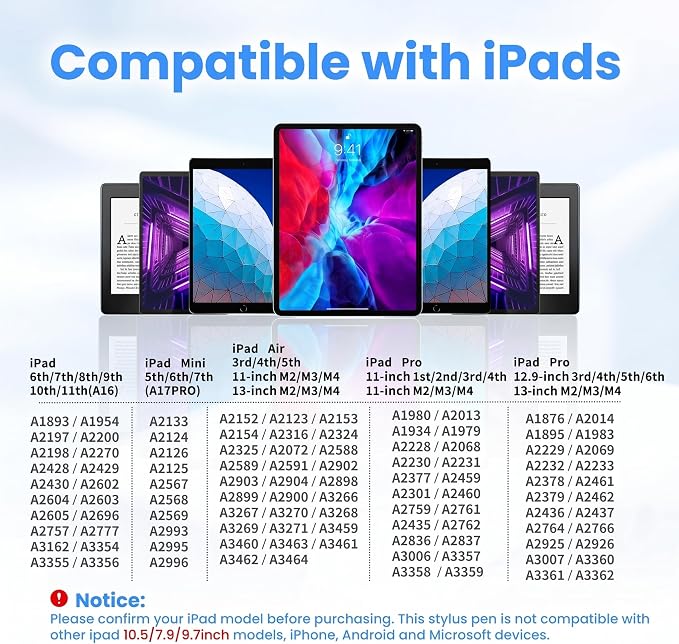
- Compatible Model -The iPad stylus compatible with iPad 2018-2026. Pencil for iPad A16/10th/9th/8th/7th/6th gen, iPad Mini 7/6/5th gen, iPad air 11" & 13" M4/M3/M2, iPad air 5/4/3rd gen, iPad Pro 11" & 13" M4/M5, iPad Pro 11-inch 3/2/1 gen, iPad Pro 12.9-inch 6/5/4/3 gen, Magnetic Wireless Charging only for iPad Pro 12.9" 3-6th gen, iPad Pro 11" 1-4th gen, iPad air 4/5th gen, iPad Mini 6th gen. Please verify your iPad model (Settings > general > About) before purchasing to ensure compatibility
- Touch Switch & 1.0 mm Super Fine Nib - This iPad a16 pencil has an superfine tip (Additional nib accessories included). Sensitive signal transmission. If you are used to drawing and sketching. The 1.0mm fine nib can provide you with high precision control and smooth writing experience for drawing and sketching. Long press the button 3s to turn it ON/OFF. Easy to use
Product description
Why does the iPad pencil seem not to work or won`t turn on?
Why can't the stylus pen be charged?
Does the stylus pen require Bluetooth pairing?
Is the stylus pen compatible with all iPad models?
Is this QLAYA stylus pen the same as Apple Pencil or a universal stylus?
Why does the iPad pencil seem not to work or won`t turn on?
Please make sure the stylus is fully charged and press the power button correctly to turn it on. If the indicator light is on, the stylus is working. Also confirm that your iPad model is supported by our iPad pencil.
Why can't the stylus pen be charged?
Before charging with the cable, please check if there are any foreign objects in the charging port. Wireless charging is only supported for specific models of iPad mini/air/ pro. If used with unsupported devices, stylus will not be able to charge.
Does the stylus pen require Bluetooth pairing?
No. Our stylus pen does not require Bluetooth pairing to write or function normally. It works directly with supported iPad models once powered on. Bluetooth is connected in order to use our stylus shortcut function and real time power display.
Is the stylus pen compatible with all iPad models?
No. our stylus pen is not compatible with all iPad models. Please carefully review the supported and unsupported model list on the product page before purchasing.
Is this QLAYA stylus pen the same as Apple Pencil or a universal stylus?
No. our ipad pencil is not an Apple Pencil and is not a universal stylus. Compatibility and features depend on specific iPad models.