MobileNest
AVerMedia Portable Charger Switch 2 Dock 100W GaN Fast Charging USB C Hub TV Docking Station with 4K60 HDMI Compatible with iPhone iPad Laptop PC Gaming Accessories
AVerMedia Portable Charger Switch 2 Dock 100W GaN Fast Charging USB C Hub TV Docking Station with 4K60 HDMI Compatible with iPhone iPad Laptop PC Gaming Accessories
Couldn't load pickup availability
- 4-in-1 USB Charging Hub : Compact and lightweight, enables video output, charging, data transfer, hardware expansion, and works as a keyboard and mouse adapter for Nintendo Switch. - 4K60Hz HDMI Output for Big Screens: Use as a Nintendo Switch Dock, Steam Deck Dock, ROG Ally Dock, PS Portal Charging Dock or HDMI Hub to connect to TVs or External Monitors. - 100W GaN USB Charger with Overload Protection: Power up to three devices simultaneously via 2 USB-C and 1 USB-A ports. Ideal for students, multi-device users, and accessories for gamers - Wide Compatibility for All-in-One Charging: The AVerMedia GC313 Traveling Dock works seamlessly with Nintendo Switch, ROG Ally, Steam Deck, MacBook Air/Pro, iPads, iPhones and more. - What’s Included: AVerMedia GC313 CORE GO USB-C Fast Charger x1, USB Type-C to Type-C Braided Cable (2m/6.56ft) x1, Changeable AC Plug x1, and Quick Start Guide x1.
Product description
Find Your Nintendo Switch Dock
How to set up the GC313 Core GO with the Nintendo Switch 2?
Why is there no sound on the TV monitor connected to the HDMI output?
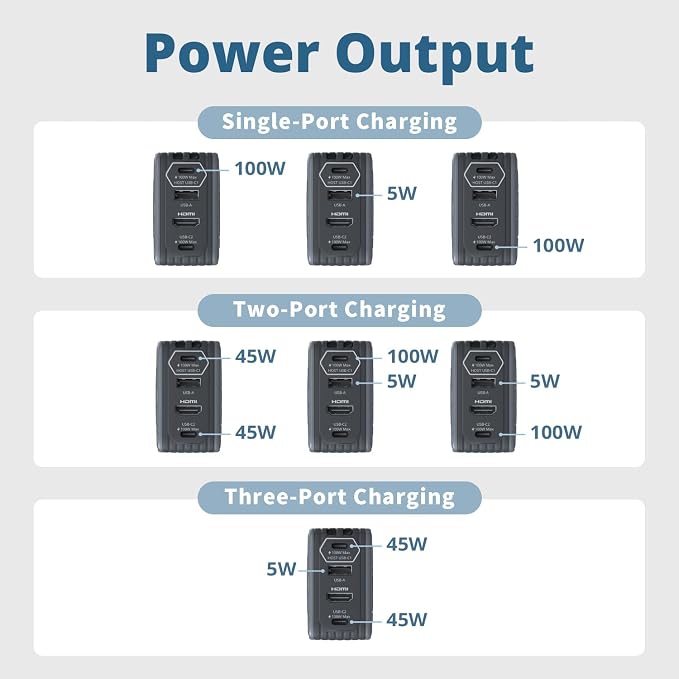
Can GC313 charge multiple devices simultaneously and support fast charging?
What is the maximum resolution output supported by the HDMI port on the GC313?
How do I ensure proper charging of my device via the GC313?
How to set up the GC313 Core GO with the Nintendo Switch 2?
Visit the AVerMedia website to download the latest firmware and software for your GC313 Core GO.
Note: Firmware update tool is available for Windows only, not macOS.
For troubleshooting, check our official FAQ.
Why is there no sound on the TV monitor connected to the HDMI output?
Ensure the signal source has audio and use the included C-to-C cable to connect to the C1 port. Connect GC313 to a monitor via HDMI. Confirm the correct audio output device is selected on your PC. Third-party cables may not work.
Can GC313 charge multiple devices simultaneously and support fast charging?
Use a 100W USB-C charger and 5A cable to avoid slow charging or damage. GC313/GC313PRO supports only USB PD 3.0. Incompatible protocols (e.g. QC, AFC, Warp Charge) may cause issues. Check power and compatibility before use.
What is the maximum resolution output supported by the HDMI port on the GC313?
Display Resolution: 4K@60Hz (HDR10), note: DSC-compressed HDR signal is not supported.
How do I ensure proper charging of my device via the GC313?
Ensure your laptop's USB-C port supports Power Delivery (PD) and always use the included cable. Verify the charging icon appears on your screen and keep your firmware updated via our official support page.
Share