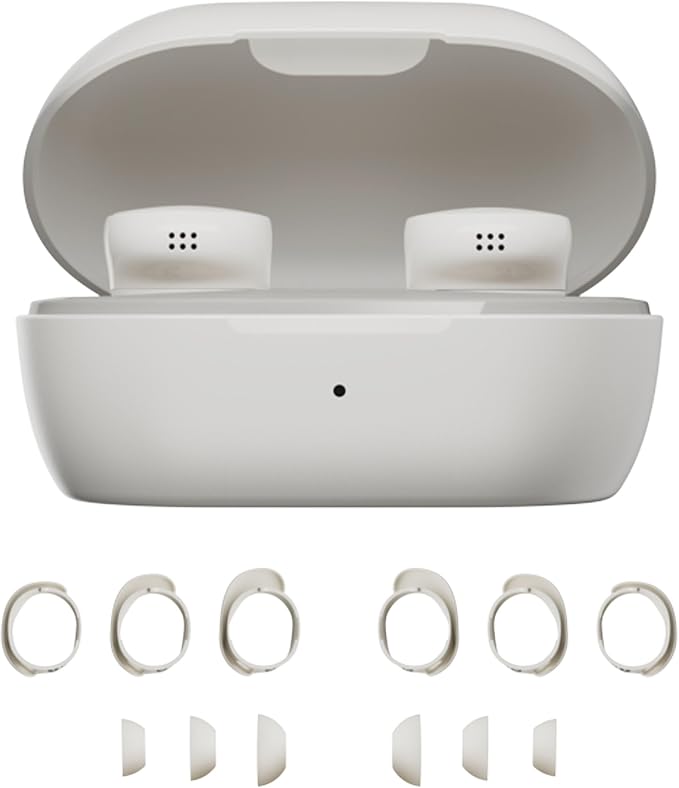
- SOUND WITHOUT COMPROMISE: Seize the day your way and defy distractions using these wireless earbuds with world-renowned noise cancellation for a listening experience that makes the everyday sound epic
- POWERFUL, PROVEN AUDIO: Get into it while you get after it, these IPX4-rated wireless earphones feature remarkable sound quality for a satisfyingly rich listening experience that hits all the right notes and perfect for workouts or running
- SEIZE-THE-DAY STAYING POWER: These noise cancelling earbuds have wireless charging and let you listen for up to 8.5 hours* and a quick 20-minute charge in the wireless case extends the playback by up to 2 hours***. USB-C cable also included
- A FIT THAT WON’T QUIT: To help you achieve the perfect fit, a trio of eartip and stability band sizes are included to ensure your in ear headphones feel comfortable, snug, and secure for a personalized fit
- HANDS-FREE, HASSLE-FREE SWITCHING: Bluetooth multipoint lets you seamlessly connect the Bluetooth earbuds to multiple devices at once while Bluetooth 5.3 technology keeps you connected within up to 30 feet of your device
- CONTROL AT YOUR FINGERTIPS: These Bluetooth earphones feature customizable tap control buttons that give you the power to skip songs, up the volume, and pause and play as you please
- FULL CONTROL WITH THE BOSE QCE APP: Seamlessly control EQ settings like bass, mid-range, and treble levels to perfectly customize the sound, or use the app to check battery life and manage connected devices
From the manufacturer
Bose QuietComfort Earbuds
How do I setup to my Bose QuietComfort Earbuds?
How do I connect my Bose QuietComfort Earbuds to my Bluetooth device?
How can I update my Bose QuietComfort Earbuds?
How do I reset my Bose QuietComfort Earbuds?
Can I restore my Bose QuietComfort Earbuds to factory settings?
How do I setup to my Bose QuietComfort Earbuds?
For the best experience, download and install the Bose QCE app from your mobile device's app store and follow the instructions.
How do I connect my Bose QuietComfort Earbuds to my Bluetooth device?
You can do this through the Bose QCE app. Alternatively, touch and hold either earbud for 4 seconds until you hear "Ready to pair" > Go to Bluetooth settings on your device > Select the earbuds.
How can I update my Bose QuietComfort Earbuds?
When an update is available, a message displays in the Bose QCE app on the product control screen. To begin the update, tap the message and follow the app instructions.
How do I reset my Bose QuietComfort Earbuds?
Touch and hold each earbud for 15 seconds until you hear a tone. The earbuds will power off. Then hold each earbud for 1 second to power them on.
Please note: Each earbud must be powered on/off individually.
Can I restore my Bose QuietComfort Earbuds to factory settings?
Yes. Delete the earbuds from your device's Bluetooth list. Then touch and hold the right earbud for 7 seconds until you hear "Ready to pair" followed by a tone. Release when you hear the tone. The earbuds are now in their original out-of-box state.