MobileNest
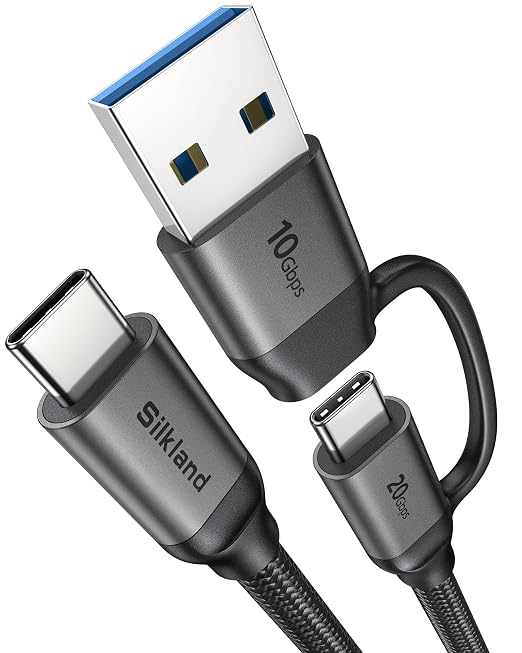
Silkland 2 in 1 USB A to USB C Data Cable Short 1FT USB C to USB C Cable | 20Gbps USB C 3.2 Gen 2x2 10Gbps USB A 3.1/3.0 5K/4K@60Hz Display 15W/240W Charging for iPhone Samsung Macbook SSD Laptop
Silkland 2 in 1 USB A to USB C Data Cable Short 1FT USB C to USB C Cable | 20Gbps USB C 3.2 Gen 2x2 10Gbps USB A 3.1/3.0 5K/4K@60Hz Display 15W/240W Charging for iPhone Samsung Macbook SSD Laptop
Couldn't load pickup availability
- 2-in-1 Design-One Cable for All: A true 2-in-1 usb cable with USB-A to USB-C and USB-C to USB-C in one. No more multiple cords. Travel, office, home, or car-one cable covers charging, data transfer, and video output for phones, laptops, docks, monitors, SSDs, and more. - USB-A to USB-C Cable: USB A 3.1 supports speeds of up to 10Gbps-twice as fast as USB 3.0, 20x faster than USB 2.0. The usb to usbc cable supports 5V/3A (15W) PD or 9V/2A(18W) fast charging. Charge a Samsung Galaxy S23 Ultra from 0% to 50% in 35 min via USB-A; It's also backward compatible with USB 3.0 and USB 2.0 - USB-C to USB-C Cable: Full USB 3.2 Gen2x2, up to 20Gbps- transfer 10GB files in under 6 seconds. PD 3.1 fast charging up to 240W (48V/5A) with e-Marker chip. In just 35 minutes, this c to c cable charges an iPhone 17 Pro Max to 75% and a MacBook Pro 14" to 50%. Backwards compatible with 140W/100W/65W/45W chargers. - 5K/4K for USB C Monitors: Silkland type c to type c cable supports video output up to 5K@60Hz, 4K@60Hz, and 4K@144Hz - perfect for connecting your USB-C laptop to USB-C monitors, portable monitor, or docks. One cable for high-end work and entertainment. Note: USB A to USB C does not supports video output. - Wide Compatibility: Works with all USB-C devices, including iPhone 17/16/15 series, Samsung Galaxy S24/S23/S22/S21 series, Note 20, Pixel 8/7/6, Xiaomi, Huawei, tablets, laptops, Macbook Pro/Air, iPad Pro/Air/mini, SSDs, monitors, portable monitors, docking stations, game consoles, and more. It also supports Android Auto and CarPlay. - Built to Last: Built with a high-strength nylon braided jacket and aluminum alloy shell, tested to withstand 45,000 bends. Inside, 28AWG tinned copper core reduces resistance and signal loss. The tinplate shielding blocks interference, ensuring stable, reliable transmission every time. - What You’ll Get: 1x 1FT Silkland USB A to C and USB C to C 2 in 1 cable, with our 24-month product replacement date, and post-sale support with our technical team within 18 hours.
Product description
Why can't I achieve 10 Gbps speeds when using a USB-A to USB-C cable?
Why can't I achieve 20 Gbps speeds when using a USB-C to USB-C cable?
Why is my device charging so slowly?
Why is no video showing on my USB?C monitor?
Why won‘t Android Auto or Carplay launch in my car?
Why can't I achieve 10 Gbps speeds when using a USB-A to USB-C cable?
For 10 Gbps speeds, both the USB-A port (marked USB 3.0/3.1, usually blue) and the connected USB-C device must support 10Gbps; otherwise, the transfer will drop to the lowest supported speed.
Why can't I achieve 20 Gbps speeds when using a USB-C to USB-C cable?
Similarly, to achieve 20 Gbps speeds with a USB-C to USB-C connection, both the USB-C port(mark USB 3.2 Gen 2x2 or SS 20 Gbps) and the connected device must support 20 Gbps speeds. The cable also compatible with 10Gbps, 5Gbps.
Why is my device charging so slowly?
Please check if your adapter supports the PD3.1 or QC3.0 fast charging standard and that its maximum output power meets or exceds your devices requirements.
Why is no video showing on my USB?C monitor?
Your laptop‘s USB?C port must support DisplayPort Alt Mode or Thunderbolt. If it only supports data or charging, video won’t work. Also, the USB?A to C mode does not support video output.
Why won‘t Android Auto or Carplay launch in my car?
Ensure your device meets the OS requirement (Android 6.0+ or iOS 8.0+) and your car's USB port supports data transfer, not just power; for iPhone users, also verify that CarPlay is enabled in Settings > Screen Time > Allowed Apps.
Share