MobileNest
Slim Pen 2 Compatible with Surface Slim Pen 2 Surface Pro 8 Pro 9 Pro X Pro 10 Stylus Pen for Surface Laptop StudioBluetooth 5.0 Connectivity&4096 Points of Pressure Sensitivity (No Charging Do
Slim Pen 2 Compatible with Surface Slim Pen 2 Surface Pro 8 Pro 9 Pro X Pro 10 Stylus Pen for Surface Laptop StudioBluetooth 5.0 Connectivity&4096 Points of Pressure Sensitivity (No Charging Do
Couldn't load pickup availability
- New Design: A sharper tip design lets you approach the screen at the perfect angle for ultra-precise tilting. You can write and draw by tilting the tip of the slim pen 2. - Please Note: No Charging Dock. Comfortable to Use: The stylus pen compatible with Surface pro 9 pen is lightweight, smooth and comfortable for all hands, easy to hold and control, and writes more smoothly. - Low Latency: Slim pen compatible with surface pro 8 / 9 / 10 pen has a precision ink tip, and ink flows out of the tip as soon as it touches the screen with no delay. - 4096 pressure points respond to the lightest of touches and control drawing for finer coloring and painting. - After-sales Service: Package includes 1 × Slim Pen 2 compatible with microsoft surface. If you have any question, please feel free to contact us.
Product description
Slim Pen 2 Compatible for Microsoft Surface Pro 8 Pro 9 Pro X, Stylus Pen Compatible for Surface Laptop Studio
Pinpoint Accuracy
Easy Deletion, Fast Editing
Responsive to the Artist's Touch
Always charged and ready
Compatible Models
The stylus pen compatible with Surface pro 9 pen is lightweight, smooth and comfortable for all hands, easy to hold and control.
Write and draw by tilting the tip of the slim pen 2. A sharper tip design lets you approach the screen at the perfect angle for ultra-precise tilting. And it has a precision ink tip, ink flows smoothly out of the pen the moment it touches the screen.
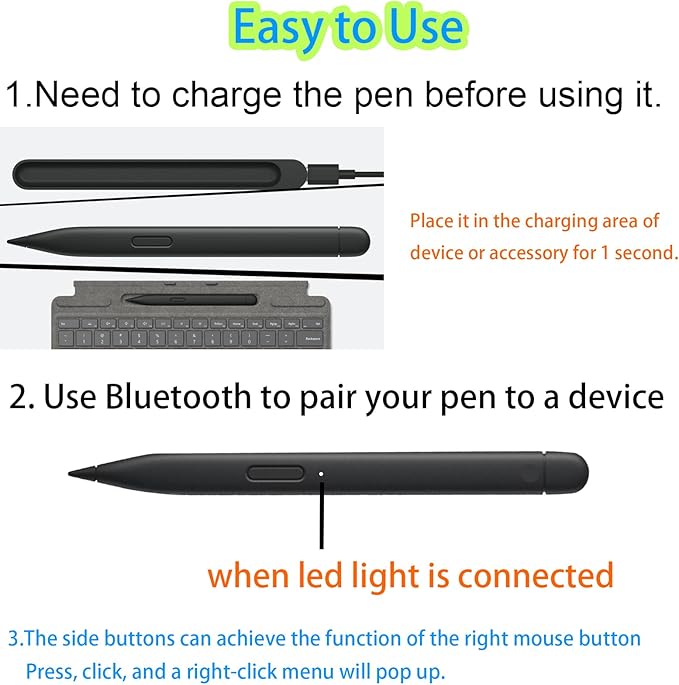
Right-click selection function and eraser function.
Simply flip and use the cap as you would a traditional pencil.
4,096 points of pressure sensitivity is what makes slim Pen 2 easy to express the finest sketches and lines. Place your hand on the screen of your device without any distractions, just as if you were writing on a notebook.
You can use the Pro Signature Keyboard or Laptop Studio's built-in wireless charging, or use the slim pen charging dock to charge your slim pen 2.
Share