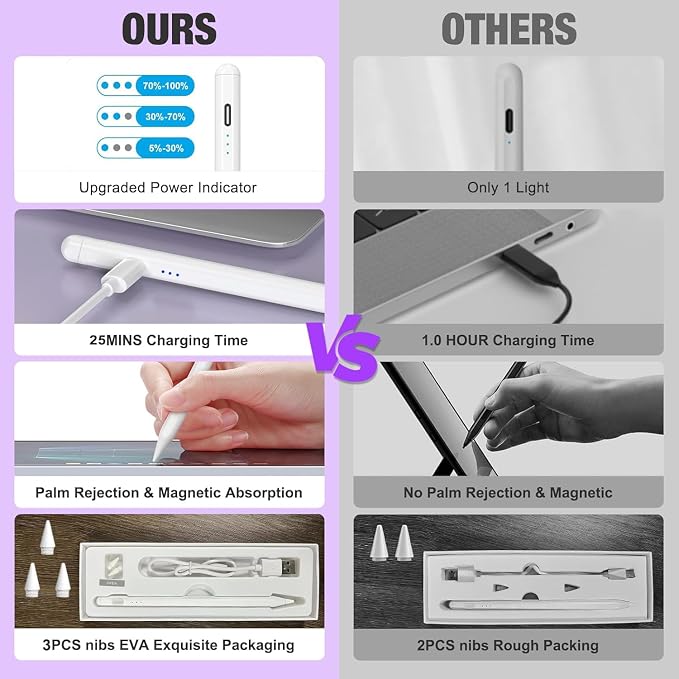
- ?【Exquisite iPad Stylus - Precision Fine Tip】The 1.5mm precision fine tip of this stylus, offering smooth and accurate writing and drawing on the iPad. Equipped with palm rejection and tilt-sensing technology, this ipad pencil allows you to effortlessly create flawless digital masterpieces, unleashing your creativity on the iPad. Note: Only compatible with iPads from 2018-2026.
- ??【Latest iPad A16 Pencil Tip】This pen for apple represents a novel breakthrough by combining with the active fine tip,It can run seamlessly on the iPad touchscreen. This iPad pencil comes with 3 replacement nibs to extend the lifetime of the Black Stylus Pen,When your iPad pen Tip runs out, it serves as the perfect backup.
- ?【Quick Charge & Long Usage Time】Charge for just 25 minutes and enjoy a whopping 10 hours of uninterrupted use. Plus, the iPad stylus powers down after 5 mins of inactivity help conserve battery power.??【Triple-Indicator Power Display】With just a glance, effortlessly gauges your pencil's battery life, ensuring you're always ready to create. Three lights signal a 60%-100% charge, two lights represent 20%-59%, and one light means it's below 20%. (Data cable is included).
- ??【Compatibility Check Needed】This pencil for Apple is designed exclusively for iPads released in 2018 - 2026. Compatible with the following models: iPad A16/11th/10th/9th/8th/7th/6th Gen, iPad Pro 11" (All Generations), iPad Pro 12.9" (3rd to 6th Gen), iPad Pro 13/11" M5/M4,iPad Mini 7/6th and 5th Gen, and iPad Air M4/M3/M2/5th/4th/3rd Gen. Before purchasing, check your iPad model in [Settings > General > About].
- ??【How to Use】This iPad pencil does not require a Bluetooth connection. Simply press the double click of the stylus to turn it on or off. If you encounter issues, deactivate your iPad's Bluetooth: go to Settings > Bluetooth > Turn off. Or, disconnect the iPad and Apple Pencil connection: Settings > Bluetooth > Apple Pencil > Click "i" > Forget this device.