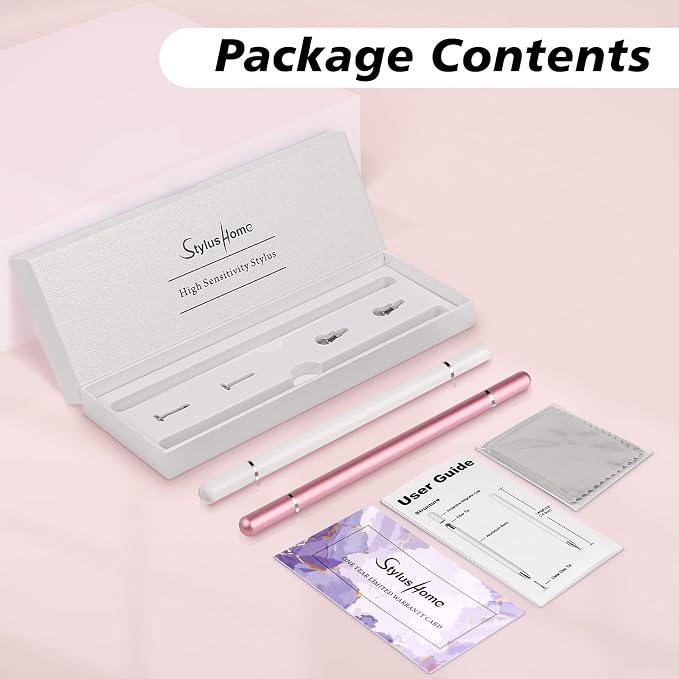
- 【Elegant Design】 - Please find StylusHome magnetic stylus Replacement Disc/ Fiber tips by searching ASIN: B08L34JX24 / ASIN: B08L355KQV. They are designed with elegant white body and clear disc tip. Pen body is made of Aluminum, Light Weight, just like a conventional pen. (NOTE: please don't remove the clear disc from the tip, or the tip won't work).
- 【Precise & Sensitivity】 - Touch screen ipad stylus pencil tip is clear and thin which allows you to see through and fine point. You can get a more quiet and accurate writing and drawing experience.
- 【Universal Stylus】 - Compatible with Smart Phones, Android Tablets, Touch Screen Laptops /PC. (Apple/ iPhone/ Ipad pro/ Mini/ Air/ Android/ Surface) and other capacitive touch screens devices,Fit For nintendo switch 2 stylus,Fit for stylus for switch 2
- 【Two-way Magnetic Cap Features】 - Magnetically attached cap will absorb in each end of stylus pens. Maximum protection on both sides of the pen. Makes it feels more like a real pen, durable and convenient.
- 【4 Replaceable Tips】 - The two styluses come with 2 Spare disc tips(diameter:0.27" )and 2 Spare fiber tip(diameter:0.24" ).Tips of both sides are replaceable and it's easy to be done in second without tool. We promise 30 days money-back and 12-months guaranty, contact us freely for any problems.
Product description
Stylus for Touchscreen
Important Instructions:
Widely compatible
Warm tips for iPad user:
High Precision Tip
The 2-in-1 touch screen pen has its one end equipped with a disc tip, which creates a precise contact point with the screen to write exactly where you place it, perfect for writing, drawing, sketching, painting and playing games on your tablet or smart phones.
Anti-Scratch Fiber Tip
There is a fiber tip in the other end, which is made of soft, and scratch resistant rubber, especially great for tapping, coloring and scrolling, keep your touch screen devices away from fingerprints and smudge.
Replacement Tips
There are 2 disc tips and 1 fiber tip included in package for replacing when the original stylus is broken or damaged, Replacing can be done in seconds, greatly extended the life of the stylus.
Magnetic Adsorption
Comes with two-way magnetic cap, no need to twist or push the pen cap back, it will be absorbed by the magnetic when you just put the cap close to either end, conveniently save your time.
Note Taking
Writing
Drawing
Playing Games
1. DO NOT remove the plastic disc at the end of the tip, if you moved the Disc, the fine tip won't work.
2. When you use this stylus, please make sure the disc is clean and then to let the disc fully touch the screen.
3. This Stylus does not support palm rejection, please make sure your hands do not lay on the screen.
4. If the stylus lag and can not write smoothly on the device, the reason would maybe the device does not run properly, please restart the device or turn off other apps.
5. You can slide the screen, but can not write in a specific app, please check the App settings or confirm whether the App supports handwriting functions.
Cautions:
1. Due to the material of the disc is conductive plastic, before using the stylus on your device, please make sure both the device screen and the disc are clean, dirt can catch onto the disc which may result in reduced sensitivity, and in some cases may even scratch your screen.
2. Normally our stylus won't cause scratches on a touch screen, but we still suggest you use a screen protector on your device to protect the screen from any possible damage/scratches which may be caused by dirt on disc/screen, damaged tips or defective product of low probability.
3. If you suspect that your disc has been damaged in any way, discontinue use. A damage disc may scratch the screen. Please replace it with a new disc.
Compatible with Apple iPad, iPad Mini, iPhone, Android Tablet, Android Phone, Samsung Galaxy and other capacitive touch screen devices.
When the stylus does not work in some iPad apps, please do the following checks:
A. Both finger and stylus do not work.
1.Please check the settings of the app.
For example:
If you find that your stylus can't write in Memo, please turn on "Draw with finger" botton in the app.
If you find that your stylus cannot write in Notability, please select "Apple pencil: Disconnect" in the app.
B. Finger works, stylus does not.
1. Confirm that the device is compatible.
2. Try to replace the replacement tip.
3.If it still doesn't work, please let us know and we will reply to you ASAP.