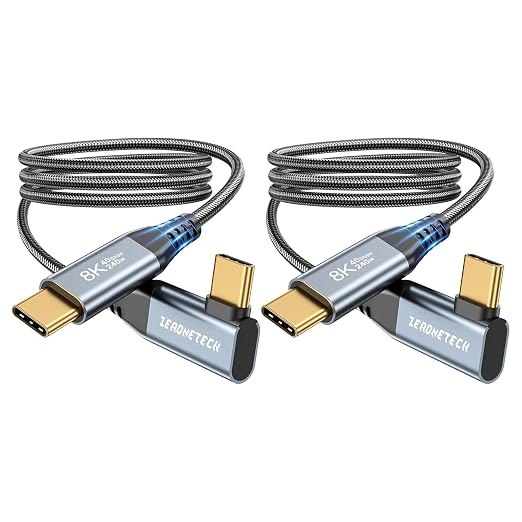
- 【Upgraded Right Angle Design】This Right Angle Type C monitor cable features an innovative 90-degree "L" design, making it easier and more comfortable to connect to your monitor, watch videos and transfer data. It can also be used in any tight corner. (Note: The thickness of the compatible mobile phone case is 5mm.)
- 【40Gbps High Speed Data Transfer】This USB C data cable is compatible with Thunderbolt 4/3, which can quickly send or receive HD movies, audio and large files, back up 10GB files in just 3 seconds, and more stable when transferring 8K/4K video signals. (Note: For the fastest transfer speeds, a device with a Thunderbolt 4/USB4 port is required).
- 【240W PD Fast Charging】240W PD 3.1 USB C Fast charging cable provides power delivery for charging your laptop, tablet or phone up with up to 240 watts; Utilizes E-marker chip to safely deliver up to 240W (48V) of power, Charges any USB-C device at max speed, and is backward compatible with 100W/65W/45W. The cable also transmits video to portable monitor while supplying power.
- 【8K/5K/4K USB C Cable for Monitors】ZeroneTeck USB C Monitor Cable supports 8K@60Hz, 5K@60Hz, 4K@144Hz video resolutions, allowing you to stream content from mobile phones, tablets and laptops directly to large screens such as monitors, HDTVs and projectors, enjoy stunning Ultra HD video and colourful picture quality.
- 【Perfectly for all USB C Monitor/Portable Monitor】This USBC to USBC Monitor cable compatible with Lenovo, HP, DELL, LG, Lasitu, Sceptre, Samsung, SideTrak, ASUS, Upperizon, CRUA, NIUTO, FOOWIN, ViewSonic and more. And KYY, ARZOPA, QQH, MNN, InnoView, Cocopar, Acer, Feiasia, AOC, GIGABYTE, PHILIPS, INNOCN, and other portable monitors
- 【Compatible with All Type-C Port Devices】Supports all PD USB C charging device, for iPhone 15/15 Plus/15 Pro/15 Pro Max, MacBook 2016/2017/2018, MacBook Air 2018/2019, MacBook Pro 13'' /15'' /16'' iPad Pro 13'' /12.9'' /11'', Samsung Galaxy Note S24/S23/S22/S21/S20 Ultra, Google Pixel 3/3a/4/4 XL. (Note: Not applicable to all types of drones.)
- 【A Cable for Life】Reinforced 90 degree end braided USBC-C cord cable with special SR joint, Lasts 20x longer than ordinary cables-proven in a ZeroneTeck laboratory environment to withstand 35000 bends. It built-in laser welding technology, which ensure the metal part won't break. 36 months after-sales service,any problem will be solved within 24 hours.
Product description
ZeroneTeck-usb 4 cable-Feature Demo
Why is my portable monitor not reaching 4K@144Hz?
Why can’t I get 40Gbps transfer speed?
Why is my device charging slowly?
What length should I choose?
How to prevent loose connection issues?
Why is my portable monitor not reaching 4K@144Hz?
To output 8K/5K@60Hz or 4K@144Hz, both your laptop and portable monitor must support DisplayPort Alt Mode with DP 2.0/2.1 (typically via USB4 or Thunderbolt 3/4/5 ports). Also, make sure your device and monitor drivers are up to date.
Why can’t I get 40Gbps transfer speed?
40Gbps requires both your host device (laptop) and accessory (SSD, docking station) to support USB4 or Thunderbolt 3/4/5. If either side only supports 20Gbps, 10Gbps, or 5Gbps, speed will automatically downgrade to match the lower standard.
Why is my device charging slowly?
For fast charging, use a charger supporting USB PD 3.1 EPR whose output power meets or exceeds your device’s requirement. This cable supports up to 240W, but actual charging speed depends on your charger and device.
What length should I choose?
0.5ft/0.15m: Compact for power banks & travel
1ft/0.3m: Fits car consoles & tight spaces
3.3ft/1m: Ideal for daily use, desks & regular connections
6ft/1.8m: Great for sofas & long-reach setups
How to prevent loose connection issues?
1. Fully insert the connector (check for thick phone cases blocking insertion)
2. Avoid sharp bending or pulling while in use
3. Confirm port and device size before use, especially for right?angle cables
4. Keep ports clean and free of dust or debris